AsyncRAT SEO Poisoning Campaign Targets Software Downloads

AsyncRAT: SEO Poisoning Hits Software Downloads | 2026
Executive Summary
In March 2026, NCC Group and FOX-IT disclosed that an unknown threat actor had been running an AsyncRAT-linked software-download campaign since at least October 2025, using fake sites for more than 25 popular applications to trick users into installing malware. The operation abused ScreenConnect for initial remote access, then delivered AsyncRAT through a VBScript and PowerShell chain that ended with process hollowing into RegAsm.exe.
For defenders, the key takeaway is simple: this is not just malicious SEO. It is a full intrusion chain that combines social engineering, trusted tooling, persistence, and post-install surveillance. Any environment that sees suspicious ScreenConnect installs after unofficial software downloads should be treated as a likely compromise and investigated through digital forensics and threat intelligence workflows.
What happened?
- October 2025: Infrastructure associated with the campaign appears, including early delivery domains and related lure activity.
- November 2025: The earliest linked payloads begin appearing in VirusTotal submissions.
- January-February 2026: The operator shifts from static file delivery paths to randomized token-based download URLs.
- March 2026: ScreenConnect-related alerts across multiple client environments trigger a deeper investigation by NCC Group and FOX-IT.
- Published findings: Researchers tie the campaign to fake download portals impersonating software such as VLC Media Player, OBS Studio, KMS Tools, and CrosshairX.
Confirmed attack flow
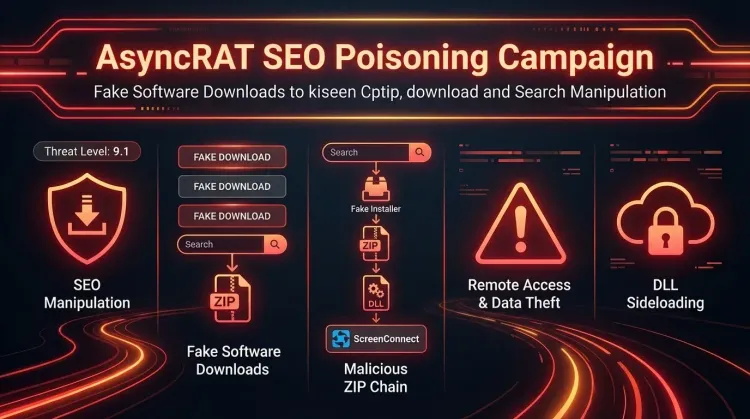
- A victim searches for a legitimate software download.
- A poisoned search result leads to a fake software site.
- The victim downloads a ZIP archive containing a real application plus malicious components.
- A malicious DLL is sideloaded when the software launches.
- The DLL extracts and silently installs a weaponized ScreenConnect client.
- The attacker uses ScreenConnect to stage VBScript and PowerShell payloads.
- AsyncRAT is injected into
RegAsm.exe, establishing persistent command-and-control.
Reported infrastructure highlights
- At least three ScreenConnect relay hosts
- At least two payload delivery backends
- More than 100 malicious files associated with the operation at the time of analysis
- More than 25 impersonated software titles across productivity tools, utilities, and games
Who is affected?
The campaign primarily affects Windows users who download software from search results instead of verified vendor domains. That risk extends beyond home users. Enterprise users, contractors, and admins often fetch utilities such as media players, hardware tools, packaging tools, and system helpers from the web, which creates a practical exposure path inside business environments.
Based on the lure catalog described by NCC Group, likely exposure is highest where users are allowed to:
- download software directly from the internet,
- run installers without application allowlisting,
- approve unexpected UAC prompts,
- and execute unsigned or unusual binaries from ZIP archives.
Because the operator used fake portals for widely searched software, sector exposure is broad rather than industry-specific.
Initial access & kill chain
This operation is best understood as a software-trust attack that blends SEO poisoning with staged malware delivery.
| Stage | Technique | Detail |
|---|---|---|
| Initial lure | SEO poisoning | Fake software sites rank for popular app searches |
| Delivery | Tokenized download backend | Unique URLs reduce the value of URL-level blocking |
| Execution | DLL sideloading | A malicious libvlc.dll runs when the victim launches the bundled app |
| Foothold | Legitimate RMM abuse | ScreenConnect is silently installed for unattended access |
| Staging | Script-based loader | VBScript writes files, then hidden PowerShell decodes and loads components |
| Execution | Process hollowing | AsyncRAT is injected into RegAsm.exe |
| Actions on objectives | Surveillance and theft | Keylogging, clipboard capture, crypto clipping, plugin-based extension |
MITRE ATT&CK-aligned view
| Tactic | Technique | ID |
|---|---|---|
| Resource Development | SEO Poisoning | T1608.006 |
| Privilege Escalation / Defense Evasion | DLL Search Order Hijacking | T1574.001 |
| Execution | Command and Scripting Interpreter | T1059 |
| Defense Evasion | Process Injection / Hollowing | T1055 |
| Persistence | Scheduled Task / Run Key | T1053 / T1060 |
| Command and Control | Encrypted channel over TLS | T1071 |
Indicators and detection
High-signal indicators
- Fake domains such as
vlc-media[.]com,studio-obs[.]net,kms-tools[.]com,crosshairx[.]pro - Delivery backends such as
fileget[.]loseyourip[.]comanddirect-download[.]giize[.]com - ScreenConnect relay host
r.servermanagemen[.]xyz:8041 - AsyncRAT C2 hosts
hone32[.]work[.]gdandmora1987[.]work[.]gd - AsyncRAT mutex
confing_me_s - Hidden directory
%AppData%\Keyboard\ - Unexpected files or services under
%ProgramFiles%\Windows Service\
Endpoint detection opportunities
Look for the following chain on the same host within a short time window:
- execution of a recently downloaded ZIP-packaged installer,
- suspicious DLL sideloading into a trusted application,
- ScreenConnect installation under a misleading product or service name,
WScript.exelaunching hidden PowerShell,RegAsm.exespawning or exhibiting injected code behavior,- new scheduled task
MasterPackager.Updateror suspiciousRunkey persistence.
Example Microsoft Sentinel KQL
DeviceProcessEvents
| where FileName in~ ("wscript.exe","powershell.exe","regasm.exe","msiexec.exe")
| where ProcessCommandLine has_any ("ScreenConnect", "installer_method2_fso.vbs", "cap.ps1", "MasterPackager.Updater", "Windows Service")
| project Timestamp, DeviceName, FileName, ProcessCommandLine, InitiatingProcessFileName, InitiatingProcessCommandLine
| order by Timestamp desc
Network telemetry focus
Prioritize detections for:
- outbound connections to known relay and C2 infrastructure,
- unexpected TLS sessions from endpoints immediately after software installation,
- repeated access to tokenized download paths under software-themed subdirectories,
- new RMM traffic where ScreenConnect is not approved.
Organizations with mature endpoint detection and response coverage should correlate process, script, registry, and network events rather than relying on one IOC alone.
Containment & remediation checklist
🔴 Immediate containment (0–24h)
- Isolate any endpoint that installed software from an unofficial download portal.
- Hunt for unauthorized ScreenConnect deployments, especially under
%ProgramFiles%\Windows Service\. - Block known relay and delivery domains at DNS, proxy, firewall, and EDR layers.
- Kill malicious
WScript.exe, hidden PowerShell, and suspiciousRegAsm.exeactivity on impacted hosts. - Remove scheduled task
MasterPackager.Updaterand inspectHKCU\Software\Microsoft\Windows\CurrentVersion\Run. - Collect memory, process tree, persistence, and network artifacts before wiping evidence.
- Reset passwords and session tokens for users of confirmed infected endpoints.
- Review clipboard-sensitive operations, especially cryptocurrency or financial workflows.
🟠 Hardening (24–72h)
- Restrict use of remote management tools to approved, inventoried deployments only.
- Block software installation from user-writable directories and ZIP unpack locations where possible.
- Enforce application allowlisting for common high-risk utilities and script interpreters.
- Alert on new ScreenConnect services, authentication packages, and credential provider registrations.
- Tighten browser and web filtering controls around fake software and typo-squatted domains.
- Educate users to validate vendor domains before downloading any software.
🟡 Longer-term controls (1–4 weeks)
- Build detections for SEO-poisoning-driven software download abuse.
- Expand monitoring for abuse of legitimate admin and remote-support tools.
- Add software acquisition policy controls for IT and non-IT staff.
- Create playbooks that combine digital forensics, threat hunting, and malware triage for suspicious installers.
- Review privileged access and installer approval processes on managed endpoints.
Strategic analysis
This campaign matters because it sits in the uncomfortable middle ground between classic malware delivery and software supply-chain trust abuse. The vendor software itself was not reported as compromised, but the attacker exploited the user expectation that “download” results from search engines are safe enough.
Three things stand out:
- Search remains an attack surface. SEO poisoning still works because it abuses user intent, not just technical weakness.
- Legitimate tooling reduces friction for attackers. ScreenConnect provided remote access, persistence, and operational flexibility while blending into administrative activity.
- The operator is iterating. The move to randomized token-based delivery shows active refinement designed to outpace simple blocklists and static detections.
In practical terms, defenders should treat unofficial software-download events as potential intrusion precursors, not just policy violations.
References
FAQ
It is an intrusion campaign in which fake software-download sites trick users into installing malicious packages that ultimately deploy AsyncRAT.
The NCC Group report does not describe a vendor-side compromise. The attack abused impersonation sites and bundled malware around expected software.
ScreenConnect gave the operator a legitimate-looking remote access foothold before AsyncRAT was deployed.
Start with unauthorized ScreenConnect installations, suspicious WScript.exe and PowerShell chains, and outbound connections to the listed relay or C2 infrastructure.
No. Any enterprise with users downloading tools from search results can be exposed, especially on endpoints without strong application control.
It reduces the usefulness of simple URL blocking because each victim can receive a different path, making domain- and behavior-based detection more important.
NCC Group highlighted its cryptocurrency clipper, geofencing logic, and dynamic plugin capability in addition to the usual remote access features.
How to cite
Lucas Oliveira. AsyncRAT SEO Poisoning Campaign Targets Software Downloads. 17 Aug 2026. Invaders Cybersecurity. https://invaders.ie/resources/blog/threat-hunting-and-intel/asyncrat-seo-poisoning-hits-software-downloads.
Subscribe via RSS.
Written by
Lucas Oliveira
Research
A DevOps engineer and cybersecurity enthusiast with a passion for uncovering the latest in zero-day exploits, automation, and emerging tech. I write to share real-world insights from the trenches of IT and security, aiming to make complex topics more accessible and actionable. Whether I’m building tools, tracking threat actors, or experimenting with AI workflows, I’m always exploring new ways to stay one step ahead in today’s fast-moving digital landscape.
Hot TopicsLast 7 days
Categories
Stay Updated
Get the latest cybersecurity insights delivered to your inbox.