FlagLeft Turns Microsoft 365 Android Apps Into a Silent Account Takeover Path

FlagLeft Turns Microsoft 365 Android Apps Into a Silent Account Takeover Path | 2026
Executive Summary
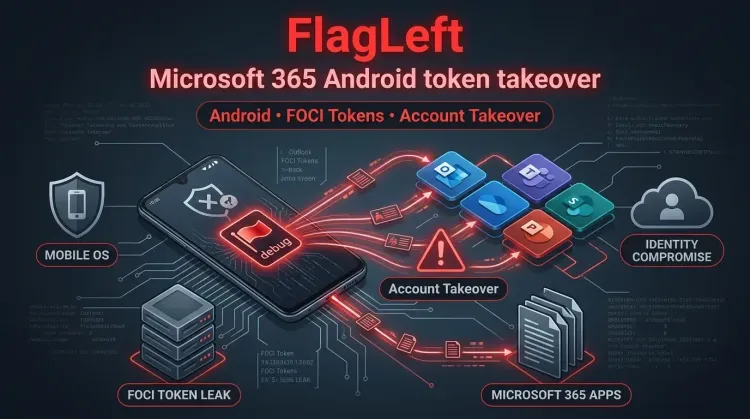
Enclave disclosed a research finding it calls FlagLeft, describing how a debug flag left enabled in production across several Microsoft 365 Android apps allowed an unauthorized app on the same device to silently obtain Microsoft account tokens. According to the report, those tokens were enough to let the malicious app act as the victim, including reading email, accessing files and documents, viewing calendars, and sending communications without any visible user warning.
The issue matters because it was not a phishing prompt or a fake login flow. It was a trust failure inside Microsoft's own Android app-to-app token sharing path. In practical terms, a broken Access Control check converted normal single-sign-on convenience into a local Account Takeover pipeline. Enclave says Microsoft confirmed and fixed the issue, but organizations using affected Microsoft 365 Android apps should still validate patch coverage and review mobile risk assumptions.
What happened?
Microsoft 365 apps on Android are designed to share account access so users do not have to sign in repeatedly across Word, PowerPoint, Excel, and related apps. That behavior by itself is expected. The failure described by Enclave was in the verification step that should ensure only trusted Microsoft apps can request and receive those tokens.
Enclave says that in multiple production Android apps the authorization check was effectively bypassed because debug mode had been left enabled:
setIsDebugMode(true)
With that flag active, Enclave says an untrusted third-party app on the same Android device could make the right token request and receive Microsoft account tokens anyway. The victim would not see a login page, a suspicious permission prompt, or any obvious sign that the handoff had happened.
Affected scope
According to the source report, Enclave confirmed the issue in these Android apps:
- Word
- PowerPoint
- Excel
- Microsoft 365 Copilot
- Microsoft Loop
- OneNote
The report also notes that Teams did not behave the same way, suggesting the problem was present across multiple apps using a shared Microsoft SDK path rather than across every Microsoft Android application indiscriminately.
Enclave further says Microsoft confirmed and fixed the issues and assigned multiple CVEs with different severity ratings across the affected apps. The article references:
- CVE-2026-41100 for Microsoft 365 Copilot for Android
- CVE-2026-41101 for Word for Android
- CVE-2026-41102 for PowerPoint for Android and Microsoft Office
Technical breakdown
The core design goal was simple: if a user is already signed into one Microsoft app, another trusted Microsoft app should be able to reuse that session context. The control that matters is verifying who is making the request.
Enclave's report says the broken path looked like this:
- a malicious or unauthorized Android app is installed on the same device
- that app requests account tokens from a Microsoft 365 Android app
- the Microsoft app should reject the request because the caller is untrusted
- debug mode in production causes the relevant protection to be skipped
- tokens are returned anyway
- the attacker reuses those tokens to act as the signed-in Microsoft account
The report says the exposed tokens were FOCI tokens, which are especially valuable because they can be reused and refreshed over time while looking like normal application traffic. That changes the issue from a one-off token leak into a longer-lived Identity and Access Management risk.
Why this matters
This case is more significant than a typical mobile app bug for three reasons.
1. The attack can stay invisible
Enclave says there is no obvious signal on the user side when the takeover path is triggered. The victim does not need to enter a password or approve a suspicious prompt.
2. It abuses legitimate trust relationships
The bug sits inside the trust boundary between first-party apps, not at an outer login screen. That means the attacker benefits from Microsoft's own token-sharing workflow once the validation step fails.
3. The blast radius follows the token
If the token grants access to Outlook data, files, documents, chats, or calendars, the compromise can move well beyond one app. In enterprise environments, that turns a local Android foothold into a broader identity and data exposure problem.
Defender takeaways
Validate mobile patch coverage now
The source article says the issue is fixed, but the immediate action is to ensure managed Android devices actually run patched versions of Word, PowerPoint, Excel, Microsoft 365 Copilot, Microsoft Loop, and OneNote.
Treat mobile app trust paths as part of identity security
This is a useful reminder that Identity and Access Management risk is not limited to the web login page or the cloud control plane. Mobile token-sharing logic can be just as critical.
Review assumptions around local attacker models
Many enterprise mobile risk models discount "another app on the same device" as if it were a lower-severity scenario. That is not a safe assumption when the device is already enrolled, the user is authenticated, and the app can silently inherit access to corporate data.
Hunt for token misuse, not just malware
If the exposed artifact is a reusable token, defenders should focus on unusual client behavior, token refresh patterns, and suspicious access continuity, not only on binary detection.
Immediate actions for defenders
🔴 Immediate actions (0-24h)
- update Microsoft 365 Android apps named in the report across managed devices
- review MDM inventory to identify devices running older Word, PowerPoint, Excel, Microsoft 365 Copilot, Microsoft Loop, or OneNote builds
- investigate whether sideloading or untrusted app installation is allowed on corporate Android devices
- review conditional access, mobile application management, and session policies for Android-based Microsoft 365 access
- alert mobile security, IAM, and incident response teams that account tokens may have been accessible locally without user interaction
🟠 Near-term hardening (24-72h)
- tighten app allowlisting or enterprise app protection policy on Android devices
- reduce exposure of sensitive Microsoft 365 data on unmanaged or weakly managed devices
- review detections for suspicious token reuse or abnormal Android client behavior tied to Microsoft 365 services
- confirm whether compromised mobile access can be constrained through device compliance and session controls
🟡 Longer-term controls (1-4 weeks)
- treat mobile SSO and token brokers as tier-one identity surfaces in threat modeling
- expand testing of first-party mobile app trust relationships during mobile application security reviews
- add mobile token abuse scenarios to tabletop exercises and incident response playbooks
- ensure high-value users on mobile devices are covered by stronger device trust and app control policies
Strategic analysis
FlagLeft is a strong example of how a small engineering mistake can distort the security meaning of an entire platform workflow. A single debug flag did not just affect logs or developer tooling. According to the report, it changed who the app considered trustworthy for account token handoff.
That distinction matters. When a bug changes trust evaluation instead of only data handling, the downstream impact is often larger than the code diff suggests. Here, convenience-driven cross-app SSO became an attacker primitive.
The broader lesson is simple: if a security control exists only as a runtime check, then shipping the wrong runtime mode can nullify the whole model. That is exactly the kind of failure path defenders and app security teams should look for in mobile identity surfaces.
References
FAQ
FlagLeft is Enclave's name for a Microsoft 365 Android issue where a production debug flag caused unauthorized apps on the same device to receive account tokens.
According to the report, an attacker could act as the signed-in Microsoft account, including reading emails, opening files, accessing documents, viewing calendars, and sending messages or communications in the victim's context.
Enclave says it confirmed the issue in Word, PowerPoint, Excel, Microsoft 365 Copilot, Microsoft Loop, and OneNote on Android.
No. The report says the malicious app did not need the user's password, a visible login prompt, or suspicious Android permissions to obtain the token through the vulnerable path.
The source report says Microsoft confirmed and fixed the issue. Organizations should still verify that affected Android apps have been updated across managed devices.
How to cite
Lucas Oliveira. FlagLeft Turns Microsoft 365 Android Apps Into a Silent Account Takeover Path. 17 Aug 2026. Invaders Cybersecurity. https://invaders.ie/resources/blog/vulnerability/flagleft-turns-microsoft-365-android-apps-into-a-silent-account-takeover-path.
Subscribe via RSS.
Written by
Lucas Oliveira
Research
A DevOps engineer and cybersecurity enthusiast with a passion for uncovering the latest in zero-day exploits, automation, and emerging tech. I write to share real-world insights from the trenches of IT and security, aiming to make complex topics more accessible and actionable. Whether I’m building tools, tracking threat actors, or experimenting with AI workflows, I’m always exploring new ways to stay one step ahead in today’s fast-moving digital landscape.
Hot TopicsLast 7 days
Categories
Stay Updated
Get the latest cybersecurity insights delivered to your inbox.