CVE-2026-21643 & CVE-2026-24858: Fortinet Critical Flaws | 2026

Executive Summary
Since December 2025, two critical vulnerabilities in Fortinet's infrastructure have created a perfect storm for enterprise compromise: CVE-2026-21643 (CVSS 9.8), an unauthenticated SQL injection in FortiClientEMS 7.4.4, and CVE-2026-24858 (CVSS 9.4), a cross-tenant authentication bypass in FortiCloud SSO affecting FortiOS, FortiManager, FortiAnalyzer, and FortiProxy. The latter is confirmed as actively exploited in the wild since early December 2025, with attackers creating rogue admin accounts and exfiltrating configurations from 100,000+ vulnerable devices globally.
Fortinet temporarily disabled FortiCloud SSO service on January 26, 2026, then re-enabled it after blocking logins from vulnerable versions. These vulnerabilities represent a continuation of Fortinet's troubling pattern of identity and management-plane exploitation, following similar critical flaws in CVE-2025-59718, CVE-2025-59719, and the still-exploited CVE-2020-12812 SSL VPN bypass.
Together, these issues demonstrate that Fortinet management and identity features have become weaponized attack surfaces, requiring organizations to treat these systems as Tier-0 assets with the same security rigor applied to domain controllers and identity providers.
THE FLAW: Dual Critical Vulnerabilities
CVE-2026-21643: FortiClientEMS SQL Injection (Remote Code Execution)
CVE-2026-21643 is a critical-severity SQL injection vulnerability (CVSS 9.1-9.8) in the FortiClientEMS web GUI that allows unauthenticated remote attackers to execute arbitrary SQL commands and potentially achieve remote code execution via crafted HTTP requests.
Technical Details:
- Component: FortiClientEMS (central management server for FortiClient endpoints)
- Attack Vector: Network (AV:N)
- Attack Complexity: Low (AC:L)
- Privileges Required: None (PR:N) - Pre-authentication exploitation
- User Interaction: None (UI:N)
- Scope: Unchanged (S:U)
- Impact: High confidentiality, integrity, and availability (C:H/I:H/A:H)
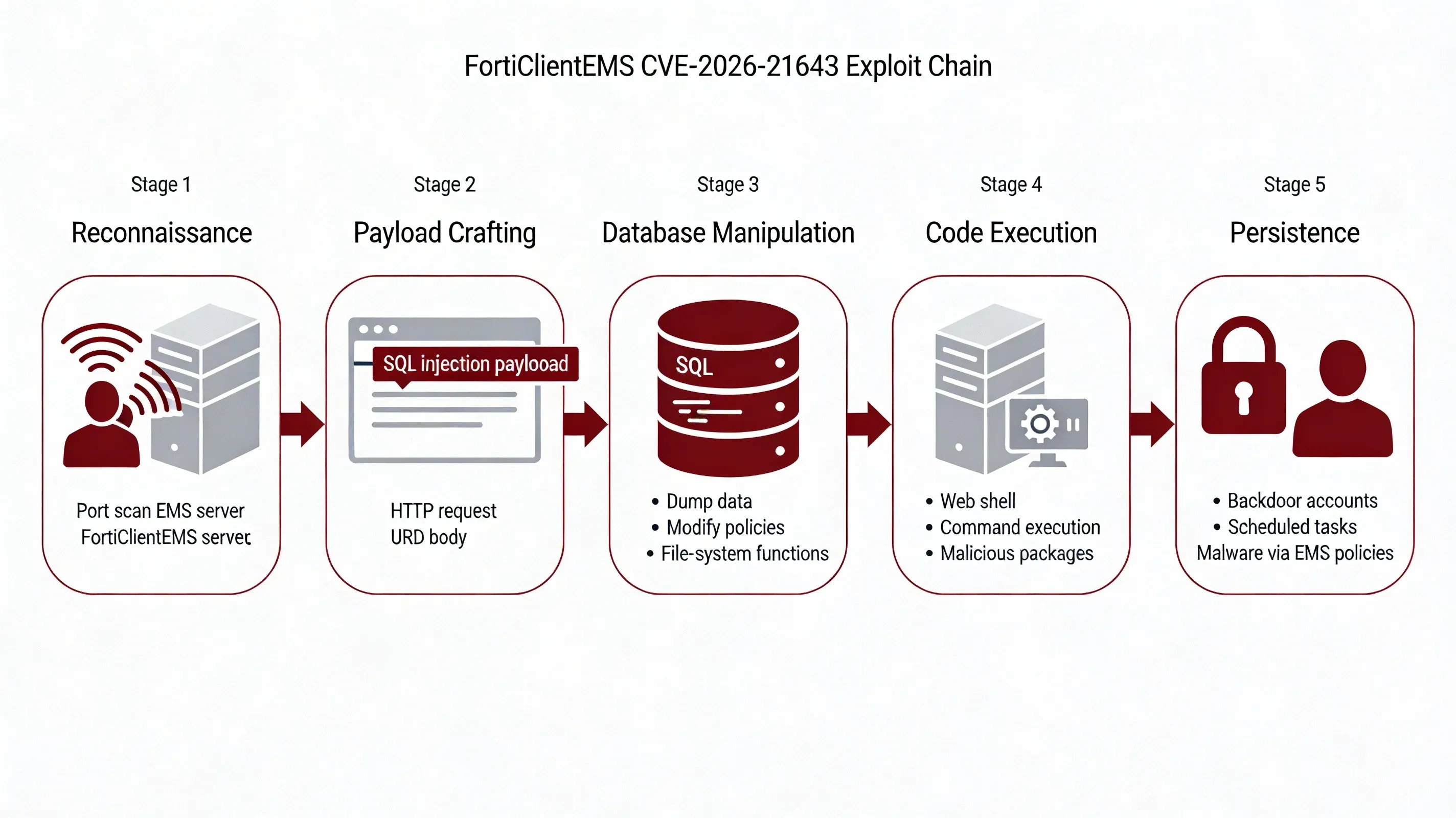
How the Exploit Works
-
Reconnaissance: Attacker identifies internet-exposed or internally reachable FortiClientEMS 7.4.4 server via port scanning or Shodan queries.
-
Payload Crafting: Attacker constructs malicious HTTP request with SQL injection payload targeting vulnerable parameters in the EMS web interface.
-
Database Manipulation: Injected SQL commands execute against the underlying database, allowing the attacker to:
- Dump endpoint inventories, policies, and user mappings
- Modify database contents to alter deployment configurations
- Leverage database functions for file system access
-
Code Execution: Attacker escalates from SQL injection to remote code execution using:
- SQL-driven file-write primitives to drop web shells
- Database command shell invocation features (e.g.,
xp_cmdshellequivalents) - Modification of endpoint deployment packages to push secondary malware
-
Persistence: Attacker establishes persistent access by creating backdoor accounts, scheduled tasks, or modifying EMS policies to deploy malware to managed endpoints.
Example Attack Pattern:
POST /api/vulnerable-endpoint HTTP/1.1
Host: ems.target.com
Content-Type: application/x-www-form-urlencoded

param=1' UNION SELECT null,null,@@version,null--
The patch—FortiClientEMS 7.4.5, released in January 2026—addressed this by implementing proper input validation and parameterized queries. However, organizational patching delays and internet-exposed EMS instances have created a significant attack surface that remains exploitable.
CVE-2026-24858: FortiCloud SSO Authentication Bypass (Active Exploitation)
CVE-2026-24858 is a critical-severity authentication bypass vulnerability (CVSS 9.4) in FortiCloud SSO that allows attackers with a FortiCloud account and registered device to log into other tenants' devices, create local admin accounts, and exfiltrate configurations.
Technical Details:
- Components: FortiOS, FortiManager, FortiAnalyzer, FortiProxy (FortiCloud SSO feature)
- Attack Vector: Network (AV:N)
- Attack Complexity: Low (AC:L)
- Privileges Required: Low (PR:L) - Requires FortiCloud account
- User Interaction: None (UI:N)
- Impact: Complete device compromise across tenant boundaries
How the Exploit Works
-
Initial Setup: Attacker creates legitimate FortiCloud account and registers at least one device to their account.
-
Cross-Tenant Exploitation: Attacker leverages improper access control in FortiCloud SSO logic to authenticate to devices registered to different organizations/accounts.
-
Admin Account Creation: Upon successful bypass, attacker creates local administrative accounts with names designed to blend in:
audit,backup,itadmin,secadmin,supportbackupadmin,deploy,remoteadmin,securitysvcadmin,system
-
Configuration Exfiltration: Attacker downloads complete device configurations containing:
- Firewall rules and network topology
- VPN settings and credentials
- Routing configurations
- User objects and authentication settings
-
VPN Access Enablement: Attacker modifies VPN settings to grant remote access to rogue accounts for long-term persistence and lateral movement.
Example Malicious SSO Accounts:
[email protected]
[email protected]
[email protected]
The patch—available across multiple FortiOS branches (7.0.19+, 7.2.13+, 7.4.11+, 7.6.6+) and equivalent versions for FortiManager/FortiAnalyzer/FortiProxy—addressed this by fixing the SSO authentication logic and implementing proper tenant isolation. Fortinet also implemented cloud-side mitigations by blocking logins from vulnerable versions.
TIMELINE: From Zero-Day to Global Exploitation
| Date | CVE | Event | Status |
|---|---|---|---|
| Early Dec 2025 | CVE-2026-24858 | Initial exploitation begins in the wild | ⚠️ Initial compromise |
| Jan 2026 | CVE-2026-21643 | FortiClientEMS SQL injection discovered | 🔍 Investigation |
| Jan 2026 | CVE-2026-24858 | Fortinet confirms active exploitation | 🔴 Active exploitation |
| Jan 26, 2026 | CVE-2026-24858 | Fortinet temporarily disables FortiCloud SSO globally | ⚠️ Emergency mitigation |
| Jan 2026 | CVE-2026-21643 | FortiClientEMS 7.4.5 patch released | ✅ Patch available |
| Jan 2026 | CVE-2026-24858 | Fixed versions released across all product lines | ✅ Patch available |
| Late Jan 2026 | CVE-2026-24858 | FortiCloud SSO re-enabled with version blocking | 🔍 Continuing threat |
| Feb 2026 | Both CVEs | Widespread patching efforts continue | 🔴 Mass exploitation risk |
ACTIVE EXPLOITATION: CVE-2026-24858 Attack Patterns
Confirmed Attacker Techniques
Fortinet and cybersecurity vendors including Arctic Wolf have confirmed the following exploitation patterns for CVE-2026-24858:
Attack Methodology
-
Automated SSO Abuse: Attackers use automated tools to attempt FortiCloud SSO logins against large lists of potential target organizations.
-
Rogue Admin Account Creation: Upon successful bypass, attackers immediately create local administrative accounts with innocuous names:
| Account Name | Purpose | Persistence Level |
|---|---|---|
audit | Appears legitimate for compliance | High |
backup | Blends with backup operations | High |
itadmin | Generic IT administration | Medium |
secadmin | Security administration disguise | High |
support | Vendor support impersonation | Medium |
backupadmin | Backup-specific admin | High |
deploy | Deployment automation | Medium |
remoteadmin | Remote management | High |
security | Security operations | High |
svcadmin | Service account disguise | Medium |
system | System-level account | High |
-
Configuration Exfiltration: Attackers download complete device configurations immediately after gaining access, containing:
- Network topology and firewall rules
- VPN configurations and credentials
- User databases and authentication settings
- Routing and NAT configurations
- Certificate stores and encryption keys
-
VPN Access Enablement: Attackers modify VPN settings to grant remote access capabilities to newly created accounts, enabling:
- Long-term persistent access
- Lateral movement to internal networks
- Data exfiltration channels
- Command and control communications
Known Malicious Indicators
Malicious FortiCloud SSO Accounts:
[email protected]
[email protected]
[email protected]
[email protected]
Exploitation Timeline:
- December 2025: Initial exploitation begins
- January 2026: Widespread automated scanning and exploitation
- January 26, 2026: Fortinet emergency response and SSO shutdown
- Late January 2026: Continued exploitation attempts against unpatched devices
PATTERN: Fortinet Identity & Management as Repeated Attack Surface
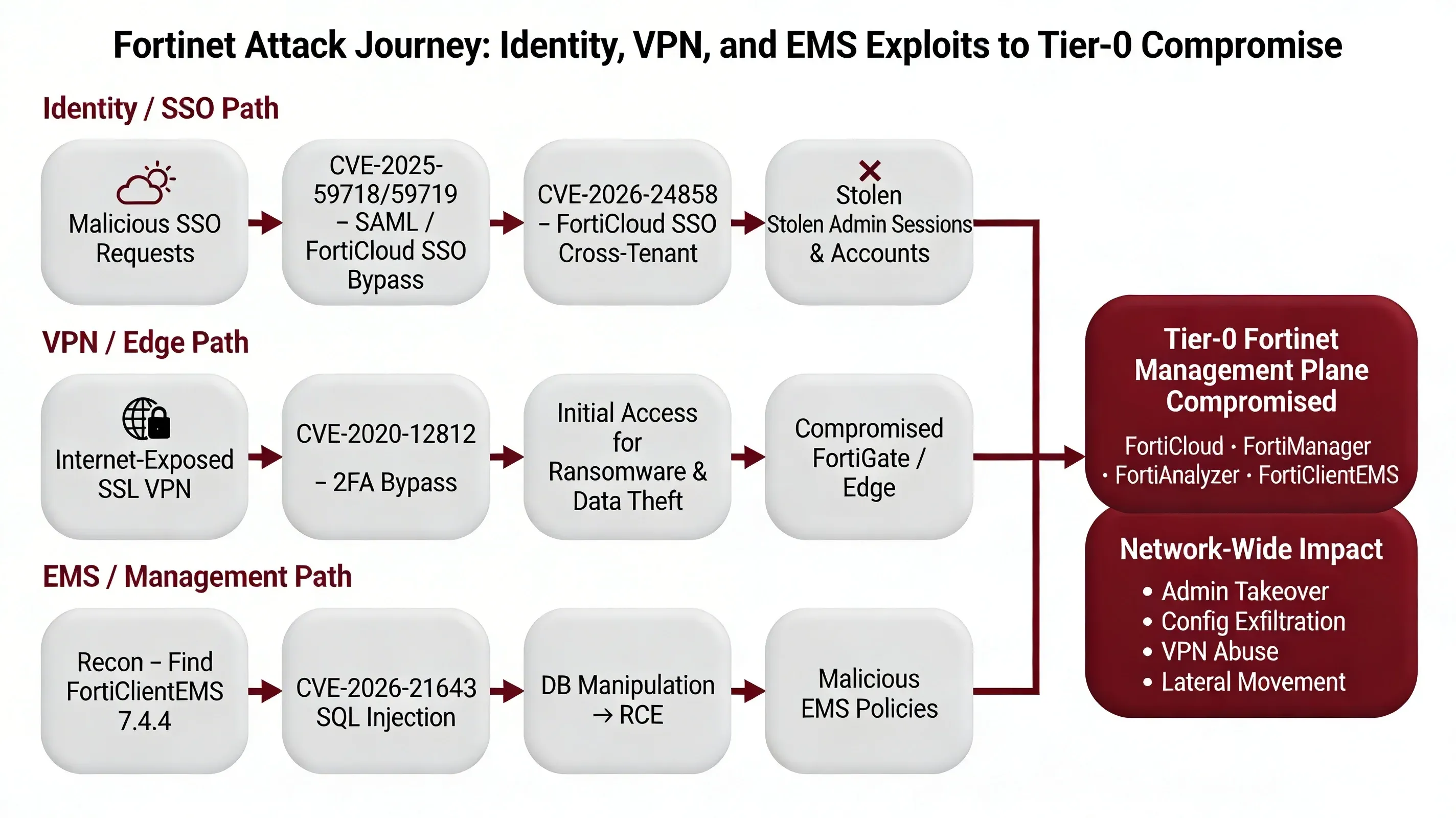
These two CVEs are not isolated incidents. Recent Fortinet history reveals a troubling pattern of identity, SSO, and management-plane vulnerabilities that have become high-value targets for threat actors:
Recent Critical Fortinet Vulnerabilities
CVE-2025-59718 & CVE-2025-59719: SAML/FortiCloud SSO Authentication Bypass
- Products Affected: FortiOS, FortiProxy, FortiSwitchManager, FortiWeb
- Vulnerability Type: SAML authentication bypass
- Exploitation Status: Actively exploited in the wild
- Impact: Unauthenticated admin access via crafted SAML messages
- Attack Vector: Malicious SSO login requests
- Confirmed By: Rapid7 threat intelligence
CVE-2020-12812: SSL VPN 2FA Bypass (Still Active in 2026)
- Product Affected: FortiGate SSL VPN
- Vulnerability Type: Two-factor authentication bypass
- Technical Flaw: Case-insensitive username validation bug
- Current Exposure: >10,000 firewalls still vulnerable in 2026
- Exploitation Status: Actively exploited by ransomware groups
- Use Cases: Initial access for ransomware deployment, data theft operations
The Recurring Attack Pattern
Attackers increasingly bypass traditional credential-based defenses by exploiting:
-
SSO Flow Vulnerabilities
- FortiCloud SSO authentication logic flaws
- SAML message processing vulnerabilities
- Cross-tenant isolation failures
-
GUI Authentication Logic
- Pre-authentication vulnerabilities in web interfaces
- Session management weaknesses
- Authorization bypass conditions
-
Legacy and Alternate Authentication Paths
- Backup authentication mechanisms
- Emergency access features
- API authentication endpoints
-
Management and Cloud Control Planes
- FortiCloud centralized management
- FortiManager/FortiAnalyzer fleet control
- FortiClientEMS endpoint management
Why Management Planes Are High-Value Targets
Centralized Policy Control: Single point of compromise affects entire device fleet
Fleet-Wide Device Access: One vulnerability grants access to hundreds or thousands of devices
Configuration Export for Reconnaissance: Complete network topology and security posture visible in configuration files
Credential Harvesting: VPN credentials, API keys, and service account passwords stored in configurations
Lateral Movement Enablement: VPN access and network configurations facilitate internal network penetration
For defenders, this pattern demands that Fortinet management plane and SSO features must be treated as Tier-0 assets, with strict access control, aggressive patching, and continuous monitoring equivalent to domain controllers and identity providers.
WHY THIS MATTERS: The Management Plane Security Gap
Key Challenges
-
Internet Exposure of Management Interfaces: Many organizations expose FortiClientEMS, FortiManager, and FortiAnalyzer management interfaces directly to the internet for convenience, creating an attack surface for pre-authentication vulnerabilities like CVE-2026-21643.
-
Delayed Patching of Management Infrastructure: Management and monitoring systems often receive lower patching priority than production firewalls, despite being equally or more critical. Organizations may patch FortiGate firewalls within days while leaving FortiManager or FortiClientEMS unpatched for weeks or months.
-
Trust in Cloud SSO Without Verification: The assumption that cloud-based SSO is inherently secure leads to insufficient monitoring of SSO authentication events. CVE-2026-24858 demonstrates that cloud SSO can become a cross-tenant attack vector when implementation flaws exist.
-
Lack of Management Plane Monitoring: Many organizations lack dedicated security monitoring for management system activities, including:
- Admin account creation events
- Configuration export operations
- SSO authentication attempts
- Policy modification tracking
-
Configuration as Attack Intelligence: Exported configurations provide attackers with complete network intelligence, including topology, security controls, credentials, and potential attack paths—yet configuration access is often insufficiently protected or monitored.
Immediate Actions
🔴 Critical Priority: Patch Immediately
CVE-2026-21643: FortiClientEMS SQL Injection
Identify All EMS Instances:
# Inventory FortiClientEMS servers in your environment
Get-Service -Name "FortiClientEMS*" -ComputerName (Get-ADComputer -Filter *).Name
Affected Version:
- FortiClientEMS 7.4.4 - VULNERABLE ⚠️
Safe Versions:
- FortiClientEMS 7.4.5+ - PATCHED ✅
- FortiClientEMS 8.0.x - NOT AFFECTED ✅
- FortiClientEMS 7.2.x - NOT AFFECTED ✅
Upgrade Path:
- Upgrade 7.4.4 → 7.4.5 or later immediately
- Consider migration to 8.0 for long-term support
CVE-2026-24858: FortiCloud SSO Authentication Bypass
Check FortiCloud SSO Status:
FortiOS/FortiProxy:
Navigate to: System → Settings → Allow administrative login using FortiCloud SSO
Status: [Enabled/Disabled]
FortiManager/FortiAnalyzer:
Navigate to: System Settings → SAML SSO → Allow admins to login with FortiCloud
Status: [Enabled/Disabled]
Recommendation: Disable FortiCloud SSO unless absolutely required for business operations.
Minimum Fixed Versions:
| Product | Branch | Minimum Safe Version |
|---|---|---|
| FortiOS | 7.6.x | 7.6.6+ |
| FortiOS | 7.4.x | 7.4.11+ |
| FortiOS | 7.2.x | 7.2.13+ |
| FortiOS | 7.0.x | 7.0.19+ |
| FortiOS | 6.4.x | NOT AFFECTED ✅ |
| FortiManager | 7.6.x | 7.6.6+ |
| FortiManager | 7.4.x | 7.4.11+ |
| FortiManager | 7.2.x | 7.2.13+ |
| FortiManager | 7.0.x | 7.0.19+ |
| FortiManager | 6.4.x | NOT AFFECTED ✅ |
| FortiAnalyzer | 7.6.x | 7.6.6+ |
| FortiAnalyzer | 7.4.x | 7.4.11+ |
| FortiAnalyzer | 7.2.x | 7.2.13+ |
| FortiAnalyzer | 7.0.x | 7.0.19+ |
| FortiAnalyzer | 6.4.x | NOT AFFECTED ✅ |
| FortiProxy | 7.6.x | 7.6.6+ |
| FortiProxy | 7.4.x | 7.4.11+ |
| FortiProxy | 7.2.x | 7.2.13+ |
| FortiProxy | 7.0.x | 7.0.19+ |
🛡️ Network Exposure Reduction (Critical)
FortiClientEMS Hardening
Restrict Management Interface Access:
1. Place FortiClientEMS behind VPN or bastion host
2. Restrict access to management VLANs only
3. Implement IP allowlisting for admin access
4. NEVER expose EMS web interface directly to internet
If Internet Exposure Is Unavoidable:
- Deploy Web Application Firewall (WAF) in front of EMS
- Enable virtual patching for SQL injection signatures
- Implement rate limiting on authentication endpoints
- Enable comprehensive request logging
Web Server Hardening:
- Enforce TLS 1.2+ only
- Disable weak cipher suites (3DES, RC4, MD5)
- Enable HTTP Strict Transport Security (HSTS)
- Implement Content Security Policy (CSP)
- Enable full HTTP request logging with URL and body metrics
FortiCloud SSO Access Control
Disable SSO If Not Required:
# FortiOS CLI command to disable FortiCloud SSO
config system admin
    edit <admin-name>
        set accprofile super_admin
        set trusthost1 <trusted-ip-range>
    next
end

config system settings
    set admin-forticloud-sso-login disable
end
If SSO Must Remain Enabled:
- Implement IP-based access restrictions
- Enable multi-factor authentication for all admin accounts
- Monitor SSO authentication events in real-time
- Implement geographic restrictions on SSO logins
🔍 Detection & Response
Threat Hunting for CVE-2026-21643 (FortiClientEMS)
Hunt for SQL Injection Attempts:
Splunk Query:
index=web_logs sourcetype=fortinet:ems
| search uri_path="*api*" OR uri_path="*admin*"
| regex _raw="(?i)(union|select|insert|update|delete|drop|exec|script|javascript|<script)"
| stats count by src_ip, uri_path, http_method, status_code
| where count > 5
| sort - count
Microsoft Sentinel (KQL):
CommonSecurityLog
| where DeviceVendor == "Fortinet" and DeviceProduct == "FortiClientEMS"
| where RequestURL contains "api" or RequestURL contains "admin"
| where RequestURL matches regex @"(?i)(union|select|insert|update|delete|drop|exec|'|--|;)"
| summarize AttemptCount=count() by SourceIP, RequestURL, RequestMethod, HttpStatusCode
| where AttemptCount > 5
| order by AttemptCount desc
File System Indicators (Web Shells):
# Search for suspicious files in EMS web directories
Get-ChildItem -Path "C:\Program Files\Fortinet\FortiClientEMS\www" -Recurse -Include *.asp,*.aspx,*.jsp,*.php,*.exe |
Where-Object { $_.CreationTime -gt (Get-Date).AddDays(-30) } |
Select-Object FullName, CreationTime, LastWriteTime, Length
Database Anomaly Detection:
-- Check for unauthorized admin accounts in EMS database
SELECT username, email, created_date, last_login, privilege_level
FROM ems_admin_users
WHERE created_date > '2025-12-01'
ORDER BY created_date DESC;

-- Check for suspicious configuration changes
SELECT config_name, modified_by, modified_date, change_description
FROM ems_config_audit
WHERE modified_date > '2025-12-01'
AND modified_by NOT IN (SELECT username FROM known_admins)
ORDER BY modified_date DESC;
Threat Hunting for CVE-2026-24858 (FortiCloud SSO)
Hunt for Rogue Admin Accounts:
FortiOS CLI:
# List all local admin accounts
config system admin
    show
end

# Look for suspicious account names:
# audit, backup, itadmin, secadmin, support, backupadmin,
# deploy, remoteadmin, security, svcadmin, system
Automated Account Audit Script:
#!/bin/bash
# Check for suspicious admin accounts on FortiGate

SUSPICIOUS_ACCOUNTS=("audit" "backup" "itadmin" "secadmin" "support" "backupadmin" "deploy" "remoteadmin" "security" "svcadmin" "system")

echo "Checking for suspicious admin accounts..."
for account in "${SUSPICIOUS_ACCOUNTS[@]}"; do
    result=$(ssh admin@fortigate "config system admin; show | grep $account")
    if [ ! -z "$result" ]; then
        echo "[ALERT] Suspicious account found: $account"
        echo "$result"
    fi
done
Hunt for Malicious SSO Logins:
Splunk Query:
index=fortinet sourcetype=fortigate:event
| search (action="login" OR action="authentication") AND method="sso"
| search user="*cloud-noc*" OR user="*cloud-init*" OR user="*admin-cloud*" OR user="*sso-admin*"
| stats count by _time, user, src_ip, dst, action, status
| sort - _time
Microsoft Sentinel (KQL):
CommonSecurityLog
| where DeviceVendor == "Fortinet"
| where Activity == "login" or Activity == "authentication"
| where AdditionalExtensions contains "sso"
| where DestinationUserName contains "cloud-noc"
    or DestinationUserName contains "cloud-init"
    or DestinationUserName contains "admin-cloud"
    or DestinationUserName contains "sso-admin"
| project TimeGenerated, DestinationUserName, SourceIP, DeviceHostName, Activity, LogSeverity
| order by TimeGenerated desc
Hunt for Configuration Exports:
FortiOS Log Query:
index=fortinet sourcetype=fortigate:event
| search action="download" OR action="export" OR action="backup"
| search file="*config*" OR file="*backup*"
| stats count by _time, user, src_ip, file, action
| where _time > relative_time(now(), "-30d@d")
| sort - _time
Hunt for VPN Modifications:
FortiOS CLI Audit:
# Check VPN configuration change history
diagnose debug config-error-log read

# Review recent VPN user additions
config vpn ssl web user
    show
end

# Check for new VPN user groups
config user group
    show
end
Known Malicious Indicators
Malicious SSO Account Patterns:
[email protected]
[email protected]
[email protected]
[email protected]
[email protected]
Suspicious Admin Account Names:
audit
backup
itadmin
secadmin
support
backupadmin
deploy
remoteadmin
security
svcadmin
system
👥 User and Administrator Awareness
Security Team Training:
- Conduct emergency briefing on both CVEs with technical teams
- Review Fortinet device inventory and patch status
- Establish accelerated patching SLA for management infrastructure
- Implement enhanced monitoring for management plane activities
Admin Account Hygiene:
- Audit all local admin accounts on FortiGate, FortiManager, FortiAnalyzer
- Remove or disable any accounts matching suspicious naming patterns
- Implement naming convention policy for legitimate admin accounts
- Require justification and approval for new admin account creation
Configuration Management:
- Treat configuration exports as sensitive data
- Implement access logging for all configuration downloads
- Encrypt configuration backups at rest and in transit
- Restrict configuration export permissions to minimal necessary personnel
📧 Network and Email Security
Email-Based Reconnaissance Defense:
- Block emails from known malicious domains (mail.io, temp-mail.org patterns)
- Implement DMARC, SPF, and DKIM for Fortinet-related communications
- Train users to recognize phishing attempts impersonating Fortinet support
Network Segmentation:
- Isolate Fortinet management infrastructure on dedicated VLANs
- Implement strict firewall rules between management and production networks
- Require VPN or bastion host access for all management interface connections
- Deploy network intrusion detection systems (IDS) monitoring management traffic
COMPROMISE ASSESSMENT
CVE-2026-21643: FortiClientEMS Breach Indicators
Treat any unpatched FortiClientEMS 7.4.4 instance as potentially compromised until proven otherwise.
System-Level Forensics
Check for Unauthorized Local Accounts:
# List local users created in the last 90 days
Get-LocalUser | Where-Object { $_.Enabled -eq $true -and $_.PasswordLastSet -gt (Get-Date).AddDays(-90) } |
Select-Object Name, Enabled, PasswordLastSet, LastLogon |
Sort-Object PasswordLastSet -Descending
Check for Scheduled Tasks:
# Find suspicious scheduled tasks
Get-ScheduledTask | Where-Object { $_.Author -notlike "*Microsoft*" -and $_.Date -gt (Get-Date).AddDays(-90) } |
Select-Object TaskName, TaskPath, Author, Date, State
Check for Web Shells:
# Scan EMS web directories for recently modified files
$webRoot = "C:\Program Files\Fortinet\FortiClientEMS\www"
Get-ChildItem -Path $webRoot -Recurse -File |
Where-Object { $_.LastWriteTime -gt (Get-Date).AddDays(-90) } |
Select-Object FullName, LastWriteTime, Length |
Sort-Object LastWriteTime -Descending
Check for Suspicious Processes:
# Identify unusual child processes of EMS web server
Get-WmiObject Win32_Process |
Where-Object { $_.ParentProcessId -eq (Get-Process -Name "FortiClientEMS*").Id } |
Select-Object ProcessId, Name, CommandLine, CreationDate
Database Forensics
Check for Unauthorized Admin Accounts:
-- Review admin accounts created during exploitation window
SELECT admin_id, username, email, privilege_level, created_date, created_by, last_login
FROM ems_administrators
WHERE created_date BETWEEN '2025-12-01' AND CURRENT_TIMESTAMP
ORDER BY created_date DESC;
Check for Configuration Changes:
-- Audit configuration modifications
SELECT config_id, config_name, modified_by, modified_date, change_type, old_value, new_value
FROM ems_config_audit
WHERE modified_date BETWEEN '2025-12-01' AND CURRENT_TIMESTAMP
AND modified_by NOT IN ('admin', 'system')
ORDER BY modified_date DESC;
Check for Deployment Package Modifications:
-- Review endpoint deployment package changes
SELECT package_id, package_name, version, modified_by, modified_date, checksum
FROM ems_deployment_packages
WHERE modified_date BETWEEN '2025-12-01' AND CURRENT_TIMESTAMP
ORDER BY modified_date DESC;
HTTP Log Analysis
Search for SQL Injection Patterns:
# Grep for SQL injection indicators in IIS/Apache logs
grep -E "(union|select|insert|update|delete|drop|exec|'|--|;|xp_cmdshell)" /var/log/ems/access.log |
grep -E "api|admin" |
awk '{print $1, $4, $7}' |
sort | uniq -c | sort -rn
Identify Suspicious IP Addresses:
# Find IPs with high error rates (potential injection attempts)
awk '$9 ~ /^(4|5)/ {print $1}' /var/log/ems/access.log |
sort | uniq -c | sort -rn | head -20
CVE-2026-24858: FortiCloud SSO Breach Indicators
Admin Account Audit
FortiOS/FortiProxy:
# Export all admin accounts for review
config system admin
    show full-configuration
end

# Check for accounts created via SSO
diagnose debug application sslvpn -1
diagnose debug enable
# Review output for SSO authentication events
FortiManager/FortiAnalyzer:
# List all admin accounts
config system admin user
    show
end

# Check admin login history
execute log filter category 0
execute log display
Configuration Export Detection
FortiOS Event Log Query:
# Search for configuration backup/export events
execute log filter field action backup
execute log display

# Search for configuration download events
execute log filter field action download
execute log display
SIEM Query for Config Exports:
index=fortinet sourcetype=fortigate:event
| search (action="backup" OR action="download" OR action="export")
| search (file="*config*" OR file="*backup*" OR description="*configuration*")
| eval export_time=strftime(_time, "%Y-%m-%d %H:%M:%S")
| table export_time, user, src_ip, dst, action, file, description
| sort - export_time
VPN Configuration Changes
Check for New VPN Users:
# List all SSL VPN users
config vpn ssl web user
    show
end

# Check VPN user creation dates in logs
execute log filter field subtype vpn
execute log filter field action create
execute log display
Check for VPN Access Grants:
# Review VPN user group memberships
config user group
    show
end

# Check for new VPN portals
config vpn ssl web portal
    show
end
Incident Response Actions
If Compromise Is Suspected:
-
Immediate Isolation:
- Disconnect compromised device from network
- Block management interface access at firewall
- Disable FortiCloud SSO on all devices
-
Evidence Preservation:
- Take disk image of compromised EMS server
- Export all logs before rotation
- Capture memory dump for forensic analysis
- Document all suspicious accounts and configuration changes
-
Credential Rotation:
- Reset all administrative passwords
- Revoke and reissue API tokens
- Regenerate SSH keys
- Rotate SSL/TLS certificates
-
System Rebuild:
- Rebuild EMS server from clean installation media
- Re-flash FortiGate/FortiManager firmware from verified images
- Restore configurations from known-good backups (pre-exploitation)
- Perform line-by-line configuration review before restoration
-
Enhanced Monitoring:
- Implement real-time alerting for admin account creation
- Enable configuration change notifications
- Deploy file integrity monitoring on management systems
- Increase log retention period to 180 days minimum
SIMILAR FORTINET CASES & LESSONS LEARNED
CVE-2025-59718 / CVE-2025-59719: SAML Authentication Bypass
Products Affected: FortiGate, FortiProxy, FortiSwitchManager, FortiWeb
Vulnerability Type: SAML SSO authentication bypass
Exploitation Status: Actively exploited in the wild (confirmed by Rapid7)
Attack Method: Crafted SAML authentication messages allowing unauthenticated admin access
Key Lesson: SAML and SSO implementations require rigorous security testing and should never be assumed secure without verification
CVE-2020-12812: SSL VPN 2FA Bypass (Still Active in 2026)
Product Affected: FortiGate SSL VPN
Vulnerability Type: Two-factor authentication bypass
Technical Flaw: Case-insensitive username validation bug allowing authentication bypass
Current Exposure: >10,000 firewalls remain vulnerable in 2026 (6 years post-disclosure)
Exploitation Status: Actively exploited by ransomware groups for initial access
Key Lesson: Legacy vulnerabilities persist for years due to patching delays; threat actors maintain exploit tooling for old vulnerabilities indefinitely
Pattern Recognition: Management Plane as Tier-0 Asset
Common Themes Across Fortinet Vulnerabilities:
- Identity and Authentication Bypass: Repeated flaws in SSO, SAML, and authentication logic
- Management Plane Targeting: FortiCloud, FortiManager, FortiAnalyzer, FortiClientEMS consistently exploited
- Pre-Authentication Exploitation: Many vulnerabilities require no credentials (PR:N)
- Cross-Tenant Impact: Cloud-based management creates multi-tenant security risks
- Delayed Patching: Management infrastructure receives lower patching priority despite higher risk
Organizational Lessons
Treat Fortinet Devices as Tier-0 Assets:
- Apply same security rigor as domain controllers and identity providers
- Implement privileged access management (PAM) for all Fortinet admin access
- Require multi-factor authentication for all administrative interfaces
- Deploy dedicated security monitoring for management plane activities
Aggressive Patch SLAs:
- Management and SSO vulnerabilities: 24-48 hour patch window
- Pre-authentication RCE vulnerabilities: 72 hour patch window
- Authentication-required vulnerabilities: 7 day patch window
- Establish emergency change control process for critical security patches
Restrict Management Plane Access:
- Never expose management interfaces directly to internet
- Require VPN or bastion host for all management access
- Implement IP allowlisting for administrative access
- Deploy network segmentation isolating management infrastructure
Centralized Logging and Detection:
- Forward all Fortinet logs to SIEM or MDR platform
- Build detections for:
- New admin account creation
- Configuration export events
- SSO login anomalies (geographic, temporal, frequency)
- Failed authentication spikes
- Privilege escalation events
- Establish 24/7 monitoring for management plane alerts
BOTTOM LINE
CVE-2026-21643 and CVE-2026-24858 represent a critical inflection point for Fortinet security posture: the management and identity infrastructure has become a weaponized attack surface requiring immediate action and long-term architectural changes.
Key Takeaways
✅ Patch Immediately - FortiClientEMS 7.4.4 and all vulnerable FortiCloud SSO versions must be upgraded within 48 hours. Active exploitation of CVE-2026-24858 is confirmed; CVE-2026-21643 weaponization is imminent.
✅ Assume Breach - Any device with FortiCloud SSO enabled during December 2025 - January 2026 should be treated as potentially compromised. Conduct thorough forensic analysis for rogue admin accounts, configuration exports, and VPN modifications.
✅ Disable FortiCloud SSO - Unless FortiCloud SSO is absolutely required for business operations, disable it immediately on all devices. The risk-to-benefit ratio does not justify enabling this feature for most organizations.
✅ Elevate Management Infrastructure Security - Fortinet management systems (FortiManager, FortiAnalyzer, FortiClientEMS) must be treated as Tier-0 assets with security controls equivalent to domain controllers: no internet exposure, mandatory VPN access, privileged access management, and 24/7 monitoring.
✅ Implement Detection and Response - Deploy the threat hunting queries and detection rules provided in this analysis. Establish real-time alerting for admin account creation, configuration exports, and SSO authentication anomalies.
✅ Learn from the Pattern - This is the fourth major Fortinet identity/management vulnerability in 18 months (CVE-2020-12812, CVE-2025-59718, CVE-2025-59719, CVE-2026-24858). Organizations must adopt a "defense in depth" approach assuming future vulnerabilities will emerge in these attack surfaces.
For Your Clients and Users
Update immediately and audit thoroughly. The cost of emergency patching and forensic analysis is negligible compared to the cost of a breach enabled by these vulnerabilities. With active exploitation confirmed for CVE-2026-24858 and pre-authentication RCE capabilities in CVE-2026-21643, the window for proactive defense is measured in hours, not days. Organizations that delay patching or skip compromise assessment are accepting material cybersecurity risk that will be difficult to justify in post-incident reviews.
REFERENCES
- CVE-2026-21643 – Fortinet FortiClientEMS SQL Injection, February 6, 2026
- RedHotCyber: CVE-2026-21643 Critical SQL Injection Vulnerability in Fortinet FortiClientEMS, February 5, 2026
- Arctic Wolf: CVE-2026-21643 – Critical SQL Injection in FortiClientEMS, February 8, 2026
- FortiGuard PSIRT – CVE-2026-21643 Advisory
- Cybersecurity News: Fortinet Confirms Critical FortiCloud SSO Vulnerability (CVE-2026-24858), January 27, 2026
- Arctic Wolf: CVE-2026-24858 – FortiCloud SSO Authentication Bypass, January 27, 2026
- FortiGuard PSIRT: Administrative FortiCloud SSO Authentication Bypass, January 26, 2026
- BleepingComputer: Over 10K Fortinet Firewalls Exposed to Actively Exploited 2FA Bypass, January 1, 2026
- Rapid7: Critical Fortinet Vulnerabilities (CVE-2025-59718/59719 & FortiCloud SSO Abuse), December 16, 2025 – January 2026 updates
- Fortinet Blog: Analysis of Single Sign-On Abuse on FortiOS, January 21, 2026
FAQ
CVE-2026-21643 is a critical unauthenticated SQL injection vulnerability (CVSS 9.8) in FortiClientEMS 7.4.4 that allows remote attackers to execute arbitrary SQL commands and potentially achieve remote code execution via crafted HTTP requests to the management interface.
CVE-2026-24858 is a critical authentication bypass vulnerability (CVSS 9.4) in FortiCloud SSO affecting FortiOS, FortiManager, FortiAnalyzer, and FortiProxy. It allows attackers with a FortiCloud account to log into other organizations' devices, create admin accounts, and exfiltrate configurations.
Update FortiClientEMS to version 7.4.5 or later immediately. FortiClientEMS 7.2.x and 8.0.x are not affected. Additionally, restrict management interface access to VPN-only or internal networks and never expose EMS to the internet.
Upgrade to the minimum fixed version for your product branch: FortiOS 7.0.19+, 7.2.13+, 7.4.11+, or 7.6.6+ (similar versions for FortiManager/FortiAnalyzer/FortiProxy). Disable FortiCloud SSO unless absolutely required. Fortinet has also implemented cloud-side mitigations blocking logins from vulnerable versions.
Yes, active exploitation of CVE-2026-24858 has been confirmed since early December 2025. Attackers are creating rogue admin accounts, exfiltrating configurations, and enabling VPN access on compromised devices. Fortinet temporarily disabled FortiCloud SSO globally on January 26, 2026 in response.
There is no public confirmation of active exploitation of CVE-2026-21643 as of February 2026. However, the combination of pre-authentication access, low attack complexity, and critical impact (CVSS 9.8) makes weaponization highly likely and straightforward.
FortiOS, FortiManager, FortiAnalyzer, and FortiProxy versions 7.0, 7.2, 7.4, and 7.6 are affected (specific sub-versions vary by product). Version 6.4 branches are not affected. Only devices with FortiCloud SSO enabled are vulnerable.
For CVE-2026-24858: Check for suspicious local admin accounts (audit, backup, itadmin, secadmin, support, etc.), review SSO authentication logs for unusual logins, and check for configuration export events during December 2025 - January 2026. For CVE-2026-21643: Review HTTP logs for SQL injection patterns, check for web shells in EMS directories, and audit database for unauthorized admin accounts.
Yes, unless FortiCloud SSO is absolutely required for your business operations, it should be disabled immediately on all devices. The security risks demonstrated by CVE-2026-24858 and previous SAML vulnerabilities (CVE-2025-59718/59719) outweigh the convenience benefits for most organizations.
CVE-2026-21643 (FortiClientEMS SQL Injection): CVSS 9.1-9.8 (Critical) CVE-2026-24858 (FortiCloud SSO Bypass): CVSS 9.4 (Critical)